 Lomme
Lomme⌥ SpaceSearch
Say it how you think it.
Type “pdfs from dana last week” and it becomes filters you can see: kind, person, dates, words inside. The line that matched is right there.
Lomme 1.0 · for Mac
Find any file by what's inside it, open any app, act on what you pick up, and see what needs you. Then press Esc and it's gone.
Pay once · every update, forever · macOS 14 or later
Everything is one key away
Press one on your keyboard, right here, to see what it does.
Try it: press K, Y or V on your keyboard
⌥ SpaceSearch
Type “pdfs from dana last week” and it becomes filters you can see: kind, person, dates, words inside. The line that matched is right there.
⌘ 1Home
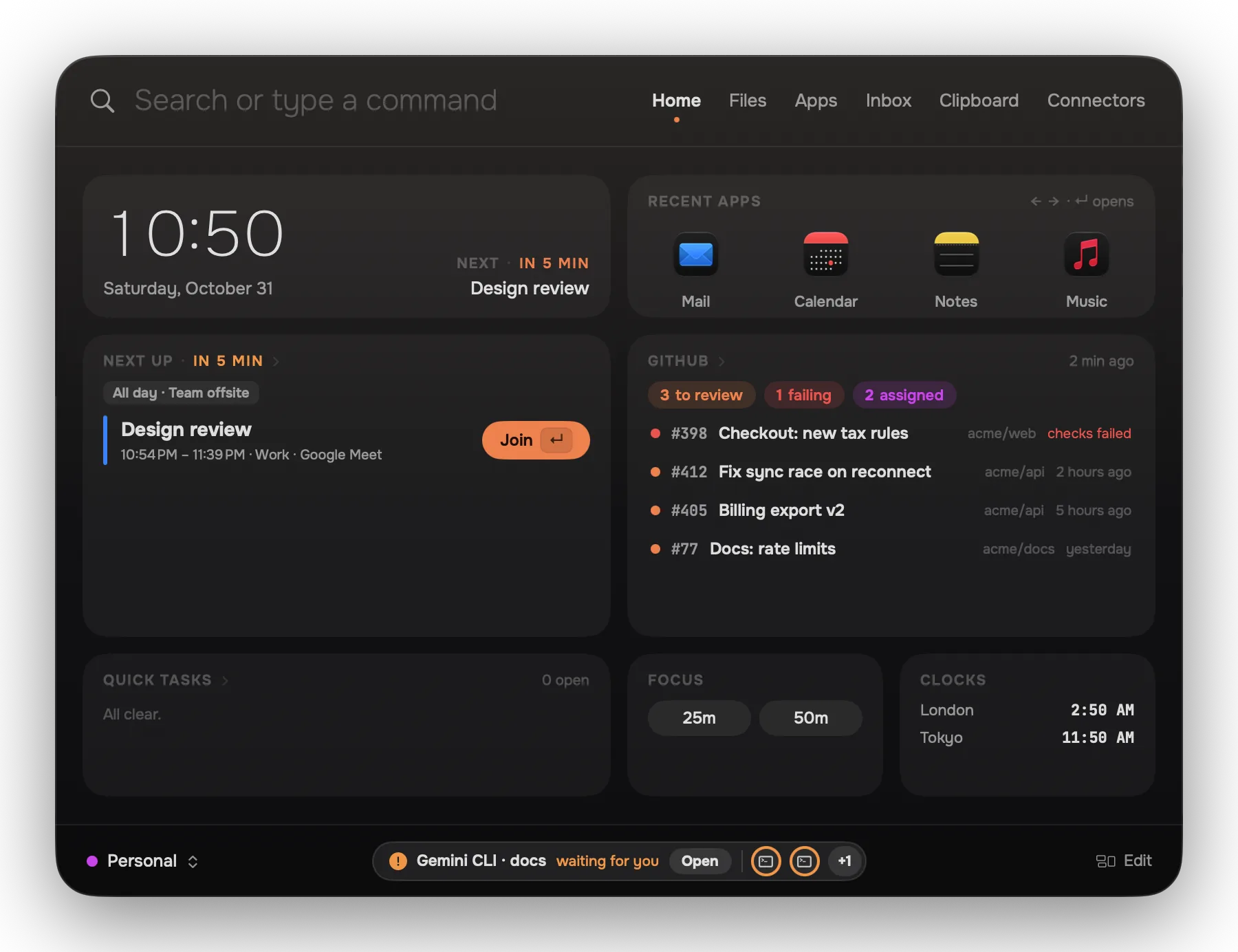
Open Lomme without typing and you're on cards you chose: your next meeting with Join, reviews waiting, Quick Tasks, a focus timer.
⌘ KIn Hand
Holds whatever you selected: files, an app, a clip, a pull request. Every action has a letter, and the result stays in your hand for the next one.
⌘ 2Files
Recent files, pinned folders, searches you kept and collections, on one desk. The folder browser is still there when you'd rather browse.
⌘ 4Inbox
Downloads, AirDrop, screenshots and Mail attachments arrive with a place to go. Sort the same kind of file three times and Lomme offers a rule.
A · DAgents ask
When Claude Code, Codex or Gemini CLI needs permission and its terminal is behind, the question comes to Lomme. A allows, D denies.
⇧ ⌘ VClipboard
Text, links, colours and pictures. ⇧⌘V opens it in any app, right where you're typing. Anything a password manager marks as secret is skipped.
⌘ YHistory
Every move, rename, trash and conversion Lomme makes is written down, with what it did and how to take it back.
⌘ 3Apps
Your apps in groups you make, a library of everything by kind, and a page for each app with its windows, documents and menu commands.
⌘ IA file's story
Arrived by Mail from Dana, sorted by your rule, opened six times, shrunk for email. Its versions, its tags, and the tools that fit it.
⌘ 6Connectors
GitHub, your coding agents, deploys, errors and revenue. Built in, read-only, with sign-ins kept in your Keychain.
⌘ ZUndo
Moved the wrong file? Renamed fifty? One key puts them back where they were. Nothing Lomme does is deleted for good.
How it feels
Lomme opens the moment you press and closes the moment you're done. It never becomes another window to manage.
⌥ Space from any app. Or ⌘ Space, once Spotlight lets go of it.
Home shows what you chose: your next meeting, reviews waiting, a timer.
Type a few letters, or pick something up and press the letter of what to do.
Esc, and you're back where you were. Nothing left open behind you.
And every day
Everything you copied, by day.
Every change leaves a receipt.
Your next call, one key away.
12% of 340, or 5 km in miles.
Bring a whole desk back.
The line that matched, shown.
A .dmg to Applications, tidied.
Third time, it offers a rule.
Before you unpack it.
CPU, memory, battery, apps.
Timers and your team's time.
A tiny list for today.
Built in, read-only, sign-ins in your Keychain.
 GitHub
 Claude Code
 Codex
Codex Gemini CLI
 Vercel
 Cloudflare
 Sentry
 Stripe
 Paddle
 RevenueCat
 RSS feeds
 Toggl Track
 Clockify
 Tailscale
Private by design
No account and no cloud of ours. Lomme works offline, and it asks before anything that changes the world outside your Mac.
Pricing
Every plan is all of Lomme. Pick how many Macs.
For your one Mac
A household or a small team
Questions
It can. Lomme never takes ⌘ Space from Spotlight behind your back: setup shows where to turn Spotlight's shortcut off, and ⌥ Space works meanwhile.
No. Lomme needs a key to start, so this site shows everything it does instead.
Your key keeps working with every new version of Lomme. No yearly fee, no paid upgrades.
Turn the old one off in Settings › License, or right from the new Mac when it asks. No emails needed.
macOS 14 Sonoma or later, on Apple silicon and Intel.